Building a Zero-Cost Expense Tracker with n8n, Gemini, and a Telegram Bot
I stopped tracking my expenses the same way most people do. Not from laziness, but from friction. Opening an app, tapping through categories, typing an amount, every single time I spent money, was never going to survive contact with real life for more than a week.
So I built something that removes the app entirely. You just text a Telegram bot the way you'd text anyone. "150 lunch with a friend" or a photo of a receipt. That's the whole interaction. Behind it, an AI reads the message, figures out the amount and category, and logs it straight into a database. No app to open, no form to fill.
The Constraint That Shaped Everything
Before writing a single workflow, I set one rule: this had to run for genuinely zero dollars, and no credit card entered anywhere, not even for a "free tier that won't charge you."
That constraint sounds simple but it quietly ruled out a lot of the obvious choices. Oracle Cloud's generous free VM tier still requires a card for identity verification. So does Google Cloud Console, which meant Google Sheets integration was off the table too, since setting up OAuth credentials for it lives behind that same wall. I ended up hosting everything locally instead, n8n running in Docker on my own laptop, with a free ngrok tunnel giving it a stable public address. Less "enterprise," more honest about what it actually is.
The Stack
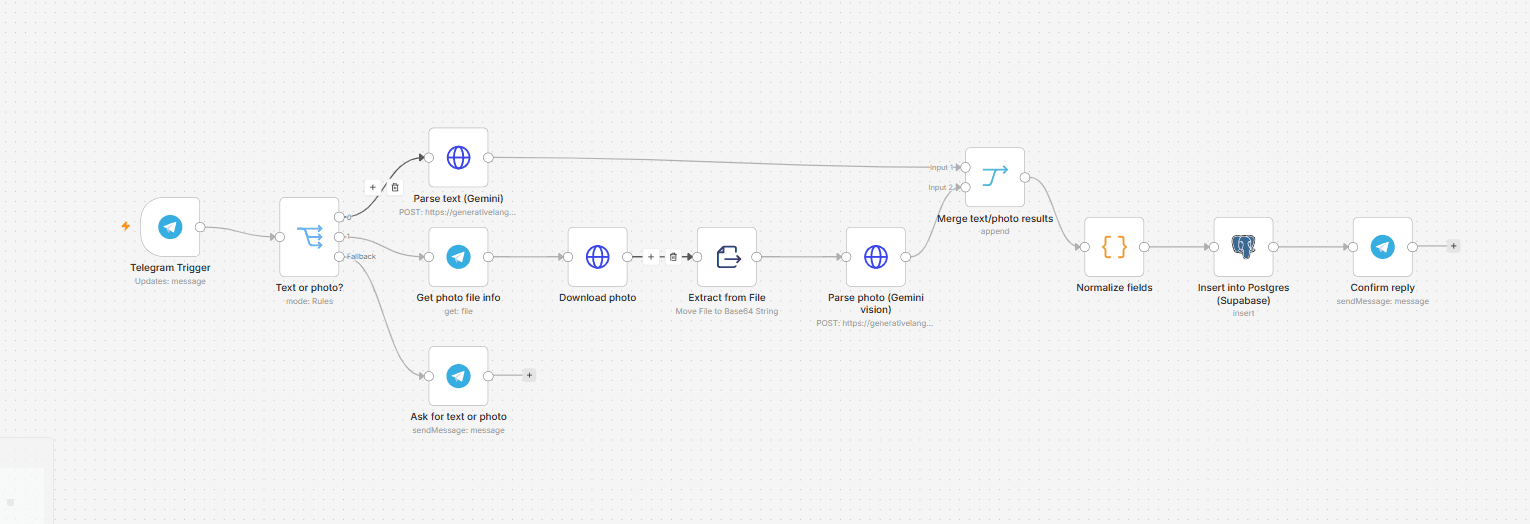
The final pipeline is straightforward on paper. A Telegram message comes in, either text or a photo of a receipt. Google Gemini reads it, whether that means parsing a sentence or doing OCR on an image, and returns structured data: amount, category, merchant, date. That gets written into a Postgres database hosted free on Supabase. A confirmation reply goes back to Telegram within a couple of seconds.
Two more workflows run quietly in the background. One sends a spend-by-category summary every Monday. The other checks daily whether any budget category has crossed eighty percent of its limit and pings me if it has.
None of this needed a browser tab open or a phone unlocked. Once Docker and the tunnel were set to auto-start, the whole thing just runs, survived a full laptop restart on the first real test.
What Actually Broke
The part worth writing about isn't the architecture, it's what went wrong along the way, because that's where the real learning happened.
A model that stopped working mid-build
Midway through testing, the AI parsing step started failing with a quota error. Not a normal rate limit, but a hard zero. It turned out the specific Gemini model I'd picked had been deprecated days earlier, with its free tier quota pulled entirely. Nothing about my code was wrong. The lesson was blunt: a model name is not permanent infrastructure, it's a dependency that can shift without much warning.
A database that couldn't be found
Supabase's default connection string comes back with "host not found" from a lot of home networks, because the direct connection is IPv6-only and quietly fails to resolve on IPv4-only setups. The actual fix, switching to the session pooler connection, wasn't something I could have guessed from the error message alone. It took reading past the surface error to the actual cause.
A bug that returned the wrong kind of nothing
The strangest one: converting a downloaded image to base64 inside a Code node kept returning the literal string "filesystem-v2" instead of the actual file data. That turned out to be a real bug in how that specific version of n8n exposed binary data inside its scripting sandbox. The fix was to stop writing that conversion by hand and use the platform's dedicated built-in node instead, which sidestepped the bug entirely.
The gap I almost shipped without noticing
The most important bug wasn't a crash at all. Once the happy path worked, text an expense, get a confirmation, see it in the database, it felt done. It took a direct question, "what happens if I send it nonsense," to expose that the system had no real validation. Any message with text, however meaningless, would get force-parsed into a fake expense and silently saved. A working demo and a trustworthy system are not the same thing, and the difference only shows up when you deliberately test the input you didn't design for.
What Stuck With Me
Free tiers are not simple just because they're free. Real infrastructure decisions, connection pooling, SSL handling, IPv6 quirks, showed up even in a personal project with no traffic to speak of.
AI models are dependencies, not fixtures. Anything built on a specific model name should be treated as something to periodically verify, not something to set and forget.
And the most useful debugging question I asked myself all week wasn't "does this work." It was "what happens when I try to break it on purpose." That question caught the one bug that actually mattered.
Where It's Headed
The bot works, and I use it now, genuinely, not as a demo. What's left is mostly refinement: a proper validation step so nonsense messages get rejected instead of logged, a monthly view alongside the weekly one, maybe a simple chart instead of just text summaries.
But the core thing I set out to prove already holds. The friction that kills expense tracking was never the math. It was the app. Remove the app, and the habit actually sticks.